
A challenge of computer work is that the same device used for work, is also a portal to endless distractions. One of my first projects for this year, was to see if I could update some of my “nag” scripts to help me return to focus quicker.
Existing Naggers
I have a few existing naggers that I have continued to use and update over the years.
Mac Nagger
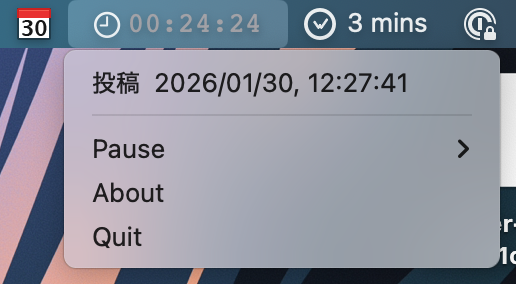
One project I wrote a while back and continue to maintain myself, is a small status bar app I called mac-nagger
I have a django
app with a model tracking values for title, start, end.
Whenever I create a new entry, it will post values to mqtt
using my django-mqtt
project.
timebox/kfdm/recent {
    "category":"勉強",
    "end":"2026-01-30T12:27:41+09:00",
    "html_link":"https://example.com/pomodoro/pomodoro/33305",
    "id":33305,
    "memo":"",
    "start":"2026-01-30T12:02:41+09:00",
    "title":"投稿",
    "url":null
}
With this, I can have any number of apps subscribe to updates of my Django models. When there is an update, my nagger app will update the timer, counting down until zero, before entering a 5 minute break.
For the 5 min break, I use NSUserNotification to notify of the break start, and count up to 5 minutes.
Once the 5 minutes is up, the timer turns red and continues to count up, showing how long it has been since the last break.
In the background, every 5 minutes, it will send a nag notification back to mqtt that I can alert on.
timebox/kfdm/nag {"duration":900,"message":"00:15:00 since last nag"}
Bell

Because it can be easy to ignore notifications when distracted from tasks, I have a small IoT bell I put together to listen to the nag topic. With my rust-bell it’s harder to ignore the notification since the sound of a bell tends to be a lot more obvious and cuts through other sounds better.
Windows Nagger
While I only use Windows for games, it can be easy to drop more hours than intended. I hacked together a simpler windows-nagger to let me know when it is a good time for a break. I did not have great luck packaging it up as a proper Windows Service but it mostly works for now. If I knew someone that did more windows programming, I might ask them to help me write a proper app but it is probably not a great return on time.
New Naggers
New to this year, is attempting to use prometheus as an additional notification channel, since I already use it to monitor my homelab.
Prometheus Timebox Alert
Prometheus’ pushgateway can be used for other metrics that do not live with a speciifc service. I use their client_python library but it is just as easy to use curl to push a metric.
# From Pushgateway docs
cat <<EOF | curl --data-binary @- http://pushgateway.example.org:9091/metrics/job/some_job/instance/some_instance
# TYPE some_metric counter
some_metric{label="val1"} 42
# TYPE another_metric gauge
# HELP another_metric Just an example.
another_metric 2398.283
EOF
Using this, I can use the same Django hooks I use for my mqtt notification and push a metric to my Pushgateway server.
After that, configuring an alert rule is straight forward.
- alert: TimeboxLostFocus
  expr: time() - last_timebox_update_timestamp_seconds > 60 * 10
  labels:
    severity: office-hours
  annotations:
    summary: Time to start a new focus session?
Noteplan Journal Alert
I have been using noteplan (and a few other things) for some notekeeping, but often forget to keep track of daily notes. Using a similar pattern, it was straightforward to setup notifications for my daily notes.
To read the notes, we first need to know the location they sync to, which I have configured as constants.
from pathlib import Path

NOTE_PLAN = (
    Path.home()
    / "Library"
    / "Containers"
    / "co.noteplan.NotePlan3"
    / "Data"
    / "Library"
    / "Application Support"
    / "co.noteplan.NotePlan3"
)
NOTE_PLAN_CALENDAR: Path = NOTE_PLAN / "Calendar"
NOTE_PLAN_NOTES: Path = NOTE_PLAN / "Notes"
We also need to know how Noteplan names it’s files
from datetime import datetime


def day(dt: datetime) -> str:
    return f"{dt.year:4}{dt.month:02}{dt.day:02}"


def week(dt: datetime) -> str:
    return f"{dt.year:4}-W{dt.isocalendar().week:02}"
With these two bits of data, it is easy to check if we have a note for today and when we last upated it.
# Get last daily modified time
# if it doesn't exist, we'll set it to midnight
daily_note: Path = constants.NOTE_PLAN_CALENDAR / (convert.day(today) + ".md")
try:
    daily_stat = daily_note.stat()
except FileNotFoundError:
    modified = today.replace(hour=0, minute=0, second=0, microsecond=0)
else:
    modified = (
        datetime.fromtimestamp(daily_stat.st_mtime)
        .astimezone()
        .replace(microsecond=0)
    )
Once the data is sent to pushgateway, we can easily setup an alert for that as well.
- alert: NotePlanDaily
  expr: time() - noteplan_daily_modified > 60 * 60
  labels:
    severity: office-hours
  annotations:
    summary: Need to update daily note
I bundled up a few of the constants and helper methods into a python-noteplan package that I can re-use in other projects and expand some in the future.
Future Work
In some cases, Prometheus would be a strange tool for this kind of alerts, but since I am already running it to monitor my homelab, it is easy to add to. A future post I may write about how I am using homeassistant for some of my notifications.